Boost Conversions with Turbo Bundles’ New Sale Badges Feature
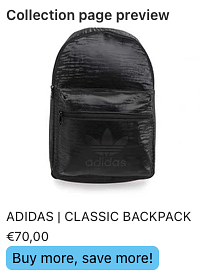
We’re excited to announce a brand-new feature inside Turbo Bundles that helps Shopify merchants increase sales and grab shopper attention: Sale Badges. [Buy more, save more!] Why Sale Badges Matter…
We’re excited to announce a brand-new feature inside Turbo Bundles that helps Shopify merchants increase sales and grab shopper attention: Sale Badges. Buy more, save more!
Why Sale Badges Matter
Shoppers respond quickly to visual cues. A small tag like “On Sale”, “Limited Offer”, or “Save 20%” can make the difference between a casual browser and a paying customer. Research shows that clear product badges:
Increase click-through rates
Highlight promotions instantly
Drive urgency and trust
With Turbo Bundles’ Sale Badges, you can now automatically showcase discounts and bundle promotions across your store.
How Turbo Bundles’ Sale Badges Work
The feature is designed to be easy, customizable, and conversion-focused:
Automatic badges: Applied to any bundle or discounted product you create.
Customizable styles: Choose colors, text, and placement to match your theme.
Dynamic updates: Badges change as offers change—no manual edits required.
Mobile-friendly design: Optimized to look perfect on any device.
Whether you’re running a flash sale, promoting best-selling bundles, or testing discounts, Sale Badges give your offers the visibility they deserve.
Benefits for Shopify Merchants
Higher sales conversions: Shoppers immediately see the value in your bundles.
Seamless integration: Works with all existing Turbo Bundles promotions.
More trust: Professional badges signal legitimacy and urgency.
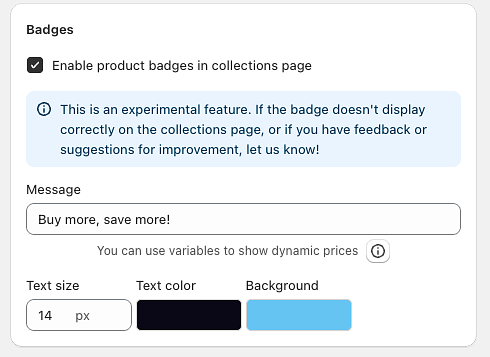
Badge Variables for Dynamic Content Make your badges even more compelling with dynamic variables that automatically display pricing information:
{lowest_deal_price} - Shows the lowest discounted price from all your bundle deals
Example: "Starting from {lowest_deal_price}" displays as "Starting from $19.99"
{max_discount_percent} - Displays the highest percentage discount available
Example: "Save up to {max_discount_percent}" displays as "Save up to 35% off"
{max_discount_amount} - Shows the maximum discount amount in dollars
Example: "Save {max_discount_amount} on bundles" displays as "Save $15.00 on bundles"
These variables automatically update based on your current bundle deals, ensuring your badges always show accurate pricing information without manual updates.
How to Get Started
While creating campaign, just make sure this checkbox is enabled. Customize your badge design and text and you are good to go! Badge example
That’s it—your Shopify store now has eye-catching promotions running automatically.
Final Thoughts
Turbo Bundles has always been about helping Shopify merchants maximize sales through smarter bundling and promotions. With Sale Badges, we’re taking that mission further by giving you a simple tool to highlight offers and boost conversions instantly.